ในบทความนี้จะเป็นการเขียนและอ่านข้อมูล Binary File บนภาษา C แบบเบื้องต้น ซึ่งจากบทความที่แล้วเป็นการเขียนข้อมูลลงใน Text File ซึ่งหากเราต้องการให้ไฟล์ที่เราใช้เก็บข้อมูลอ่านยากขึ้น ควรเขียนข้อมูลลงใน Binary File ซึ่งเป็นไฟล์ประเภทที่เรียกว่า "Binary Format" สำหรับคอมพิวเตอร์แล้วเป็นการเก็บที่ Simple ที่สุด
ท้ายที่สุดแล้ว การที่เราสามารถเขียนและอ่านข้อมูลลงใน Binary File ทำให้เราสามารถนำความรู้ไปประยุกต์สร้างนามสกุลไฟล์ใหม่สำหรับโปรแกรมของตนเองได้
fopen สำหรับทำงานกับ Binary File
คล้ายกับการเปิด Text File ในภาษา C การใช้ function ที่ชื่อ fopen กับ Binary File มีสองโหมดคร่าวๆ ที่จะใช้ในบทความนี้ คือ "wb", "ab" และ "rb"
"wb" คือการเขียนลงไปใน File โดยเขียนทับทุกครั้ง หากไม่มีไฟล์ดังกล่าวอยู่ โปรแกรมจะสร้างไฟล์ขึ้นมา
"ab" คือการเขียนต่อลงไปใน File เดิม หากไม่มีไฟล์ดังกล่าวอยู่ โปรแกรมจะเกิดข้อผิดพลาด
"rb" คือการอ่านไฟล์ Binary และเก็บข้อมูลลงในตัวแปร
โจทย์ตัวอย่าง
โจทย์ในครั้งนี้ก็เป็นการสร้างโครงสร้างข้อมูล Struct สำหรับเก็บข้อมูลสินค้า (Products) ที่ประกอบไปด้วย id (หมายเลขสินค้า) และ name (ชื่อสินค้า) ซึ่งมี pointer สองตัว ได้แก่ products ใช้สำหรับรับข้อมูลมาเก็บไว้ก่อนจะเขียนลงไปในไฟล์ และ products_buffer ใช้สำหรับเก็บข้อมูลขณะอ่านไฟล์
#include <stdio.h>
struct products {
    char id[9];
    char name[15];
} products[20],products_buffer[20];
int amount;
int menu();
void writefile();
void readfile();
int main() {
    while(1) {
        int input = menu();
        switch (input)
        {
        case 1:
            printf("[+] Entering Write Mode... \n");
            writefile();
            break;
        case 2:
            printf("[+] Entering Read Mode... \n");
            readfile();
            break;
        default:
            printf("[!] Exiting... \n");
            break;
        }
    }
    return 0;
}
int menu() {
    printf("================================== \n");
    printf("Binary File Write and Read Tools \n");
    printf("================================== \n");
    printf("1) Write to file. \n"); printf("2) Read file. \n");
    printf("================================== \n");
    int input; printf("Enter Options: ");
    scanf("%d", &input);
    return input;
}
ในตัวอย่างโปรแกรมที่ผมเขียนเราจะทำการเขียนข้อมูลลงในไฟล์ชื่อ db.bin ซึ่งเป็นประเภทไฟล์ที่เรียกว่า Binary File
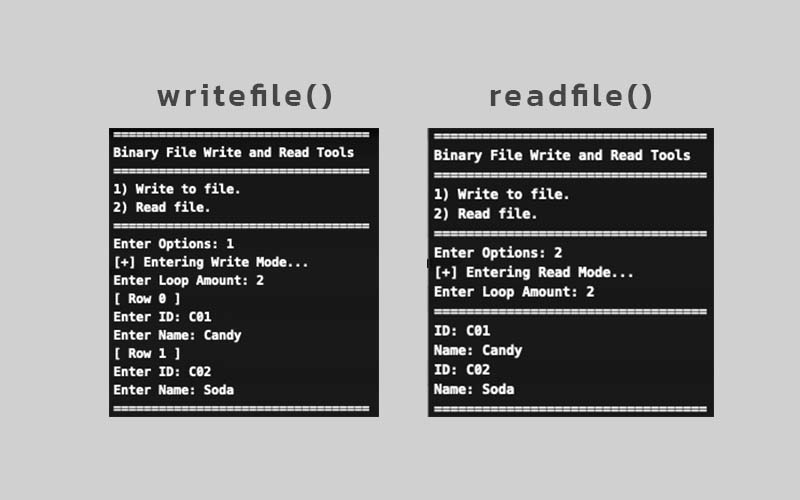
function ชื่อ writefile() จะถามผู้ใช้ถึงปริมาณแถวที่จะเขียนลงไปในไฟล์ เมื่อได้จำนวนแล้วก็จะ ทำซ้ำ (loop) ตามจำนวนนั้น โดยใน loop จะเป็นการรับข้อมูล id และ name เก็บลงใน struct ที่ชื่อว่า products ก่อน เมื่อครบแล้วจึงจะนำข้อมูลใน struct เขียนลงไปในไฟล์ db.bin
function ชื่อ readfile() จะถามผู้ใช้ถึงปริมาณแถวที่จะแสดงออกมาจากไฟล์ db.bin โดยจะตั้งค่าตำแหน่งของไฟล์โดยใช้คำสั่ง fseek ที่มี offset เท่ากับ 0 และนำข้อมูลในไฟล์มาเก็บไว้ที่ struct products_buffer
เมื่อมีการ scanf มากกว่า 2 รอบ มักพบว่าโปรแกรมจะข้ามการทำงานบางบรรทัดไป จึงใช้ fflush(stdin); เพื่อ clear buffer จะพบว่าปัญหาหายไป
void writefile() {
    printf("Enter Loop Amount: ");
    scanf("%d", &amount);
    for (int i = 0; i < amount; i++)
    {
        printf("[ Row %d ] \n", i);
        printf("Enter ID: ");
        scanf("%s", products[i].id);
        fflush(stdin);
        printf("Enter Name: ");
        scanf("%s", products[i].name);
    }
    FILE *file2write;
    file2write = fopen("db.bin", "wb");
    if(file2write == NULL) {
        printf("[!] Error Creating db.bin file.");
    } else {
        fwrite(&products, sizeof(products), amount, file2write);
    }
    fclose(file2write);
}
void readfile() {
    printf("Enter Loop Amount: ");
    scanf("%d", &amount);
    FILE *file;
    file = fopen("db.bin", "rb");
    if(file == NULL) {
        printf("[!] Error Opening db.bin file.");
    } else {
        fseek(file,0,SEEK_SET);
        fread(&products_buffer, sizeof(products), amount, file);
        printf("==================================\n");
        for (int i = 0; i < amount; i++)
        {
            printf("ID: %s \n", products_buffer[i].id);
            printf("Name: %s \n", products_buffer[i].name);
        }
    }
    fclose(file);
}

- Name (Pen name): Sunny Jirakit (Sunny420x)
- Study: Bachelor Degree of Computer Science from Chiang Mai Rajabhat University
- Personality: Architect (INTJ-T)
- Experience: JavaScript, Angular.js, React.js, Next.js Express.js, Unity C#, Socket.io
- Hobby: Organic Chemistry